Introduction
Open houses generate attention fast, but follow-up usually breaks down.
Agents collect names, notes, and quick conversations during a busy event. Afterward, the real challenge starts: prioritizing serious visitors, sending the right follow-up, and moving hot opportunities into live conversations before momentum disappears.
That is where open house lead automation creates operational leverage.
A strong workflow gives you immediate capture, consistent segmentation, and time-based follow-up so no lead depends on memory alone.
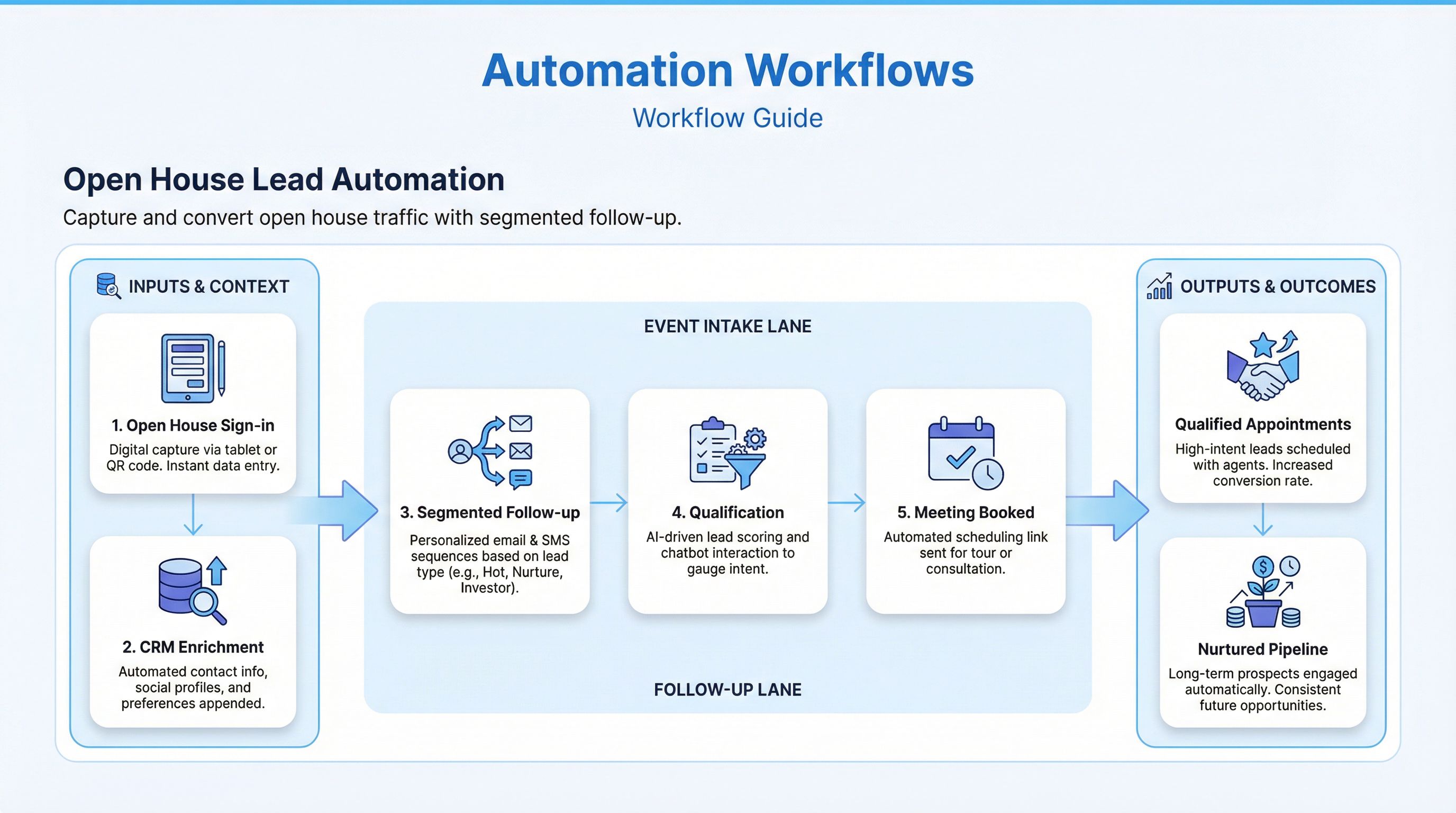
This guide explains how to design an automation system that turns open house traffic into measurable pipeline outcomes.
For the broader workflow beyond open houses, see Open House Lead Automation for the short-form solution page and Real Estate Lead Follow-Up Automation, which covers the core system this article plugs into.
What an Open House Automation Workflow Should Do
A complete workflow should:
- capture visitor data in a standardized format,
- segment leads by intent and readiness,
- trigger same-day follow-up by channel,
- route high-intent leads for rapid agent action,
- move low-intent leads into nurture without losing context.
If you only automate a thank-you email, you are not automating the workflow. You are automating one step.
Why This Matters for Conversion
Open house leads often decay in 24-72 hours.
Common failure points:
- incomplete sign-in data
- delayed first follow-up
- identical messaging to all visitors
- no clear owner for next action
- no stage tracking in CRM
A workflow-based system improves:
- response speed
- lead prioritization
- appointment booking rate
- consistency across team members
- source-level reporting quality
Core Workflow Architecture
Design your system in five layers.
1. Capture Layer
Use one structured sign-in process (tablet form, QR form, or app).
Required fields:
- full name
- email and/or phone
- buying timeframe
- financing status
- preferred area
- visitor type (buyer, neighbor, investor, agent)
Optional but useful:
- current home status (rent/own)
- price range
- interest level selection
2. Enrichment Layer
Immediately enrich each record with:
- event identifier (property + date)
- listing details
- source tag:
Open House - assigned host agent
This allows accurate attribution and downstream reporting.
3. Segmentation Layer
Segment leads quickly into actionable buckets:
Hot: ready in 0-90 days, engaged conversation, clear criteriaWarm: real interest but moderate uncertaintyLong-Term: early-stage or low urgencyNon-Buyer: neighbors, vendors, unrelated contacts
Segmentation can be rule-based at first and refined over time.
4. Follow-Up Layer
Automate channel sequence by segment:
- immediate SMS thank-you (if consented)
- immediate email recap
- timed follow-up message by readiness
- call task creation for hot leads
Follow-up should adapt to visitor behavior, not run as a fixed drip for everyone.
5. Reporting Layer
Track:
- visitor-to-contact completeness rate
- first follow-up time
- response rate by segment
- appointment booked rate
- conversion to active client
Without this layer, optimization becomes guesswork.
Recommended Operational Blueprint
Step 1: Pre-Event Setup
Before each open house:
- create event record in CRM
- connect sign-in form to CRM pipeline
- prepare message templates by segment
- define owner and backup owner
Pre-work determines post-event speed.
Step 2: Real-Time Lead Capture
During event:
- require structured sign-in
- log quick conversation notes (motivation, timeline, objections)
- mark provisional intent level
Train hosts to collect one clear next-step signal from each serious visitor.
Step 3: Immediate Post-Event Trigger (0-30 Minutes)
When event ends:
- deduplicate contacts
- apply source and event tags
- run first-touch automation
Automation actions:
- send thank-you SMS/email
- create follow-up tasks for hot and warm leads
- stage leads into
Open House Follow-Up
Step 4: Qualification Follow-Up (Day 1-3)
Run short sequence:
- Day 0: immediate acknowledgment + simple question
- Day 1: value-based follow-up (similar listings or local insight)
- Day 2/3: next-step invitation (showing or strategy call)
Stop sequence when lead replies or books.
Step 5: Route by Engagement
Behavior-based rules:
- replied quickly -> priority queue + call SLA
- opened/clicked no reply -> concise personal follow-up
- no engagement -> long-term nurture track
Routing should always create owner accountability.
Step 6: Weekly Open House Review
Review per-event metrics:
- sign-in completion quality
- segment distribution
- response and booking rates
- conversion to buyer consults
Use review data to improve scripts and qualification criteria.
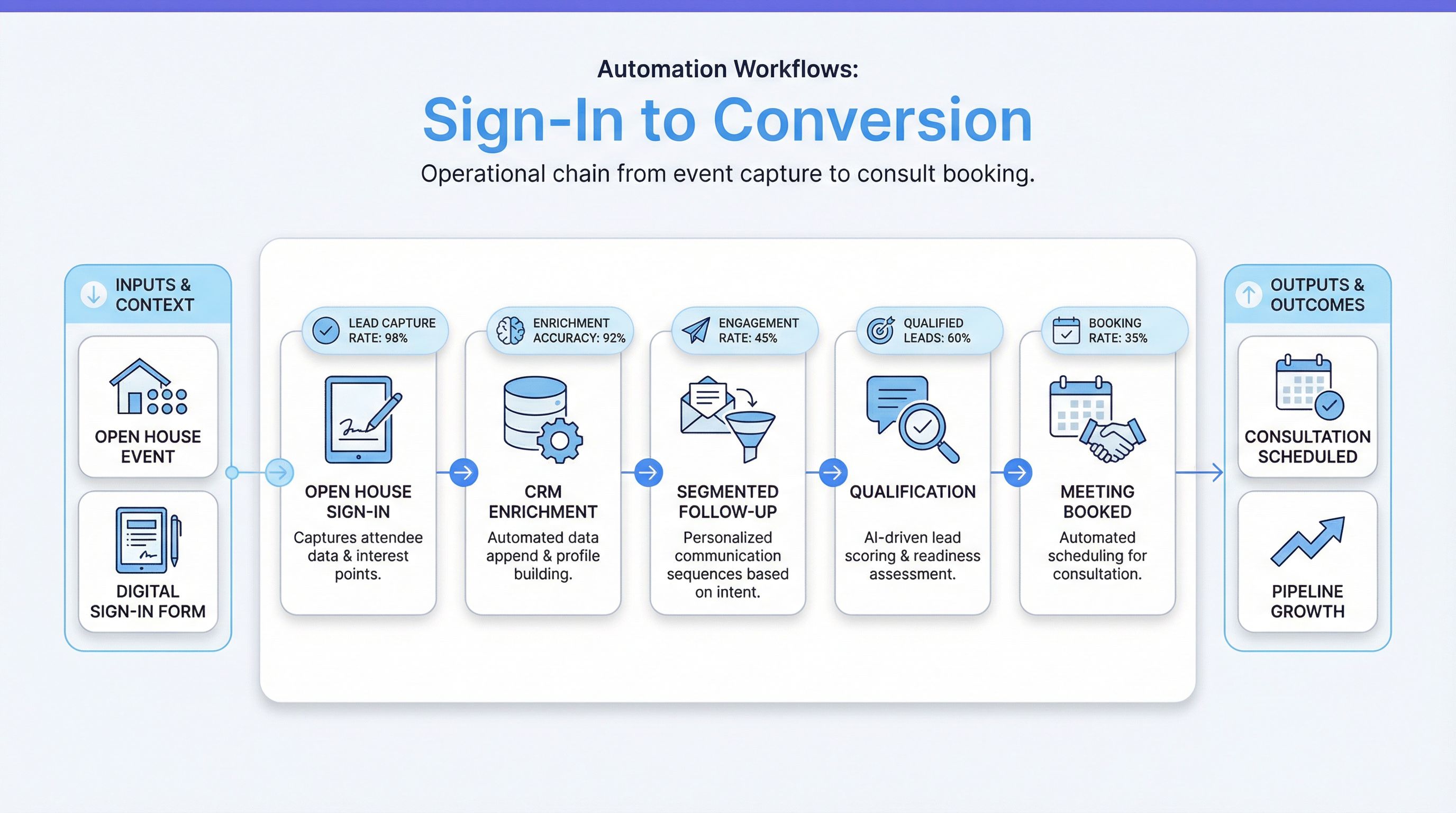
Example Follow-Up Sequence (Practical)
Touch 1: Immediate Thank-You
Goal: confirm connection and maintain momentum.
Example SMS: “Thanks for visiting [property address] today. This is [Agent Name]. If helpful, I can send 2-3 similar options based on what you liked.”
Touch 2: Next-Day Value Email
Goal: provide relevance, not generic follow-up.
Email components:
- brief thanks
- one local market insight
- tailored next-step option
Touch 3: Day 2-3 Decision Prompt
Goal: move interested leads toward a conversation.
Example: “Would a short call be useful to compare this home with current alternatives in [area]?”
Keep each touch focused on one action.
Open House Lead Scoring (Simple Starter Model)
Use a lightweight score model (0-100):
- timeline urgency (0-25)
- financing readiness (0-20)
- criteria clarity (0-15)
- in-person engagement quality (0-20)
- follow-up behavior (0-20)
Suggested bands:
Hot: 70-100Warm: 40-69Long-Term: 0-39
Score should update with new behavior events.
CRM Pipeline Design for Open House Leads
Use clear stages:
Open House CapturedFollow-Up ActiveEngagedQualifiedConsult ScheduledNurtureClosed
Automations to configure:
- stage movement on replies/bookings
- task creation on SLA thresholds
- reminders for stale records
- reactivation triggers for inactive leads
Clear stage logic prevents pipeline clutter.
Automation Guardrails and Compliance
Operational automation must stay compliant.
Set rules for:
- contact consent and opt-out handling
- sending windows by local time
- channel frequency limits
- approved message templates
- fair housing-safe language
Also suppress duplicate sends when manual outreach already occurred.
Common Operational Mistakes (And Fixes)
Mistake 1: Collecting weak sign-in data
Fix: enforce required fields and concise qualification prompts at sign-in.
Mistake 2: Sending same follow-up to every visitor
Fix: segment by intent and behavior before sequence enrollment.
Mistake 3: No handoff from automation to agent
Fix: tie segment thresholds to tasks, ownership, and SLA alerts.
Mistake 4: No event-level reporting
Fix: track each open house as a distinct source event with its own KPIs.
Mistake 5: Over-automating too early
Fix: start with core flow (capture -> segment -> 3 touches -> route), then expand.
30-Day Implementation Plan
Week 1: Process Mapping
- document current open house follow-up process
- identify delays and missed handoffs
- define stage names and segment rules
Week 2: Workflow Build
- integrate sign-in form with CRM
- configure tagging, scoring, and routing
- create message templates and task logic
Week 3: Testing and QA
- simulate event with test leads
- verify branching and stop conditions
- validate opt-out and duplicate suppression
Week 4: Launch and Optimization
- launch at live open house events
- monitor response and booking rates
- refine copy and scoring thresholds
Run this cycle for at least 2-4 events before major changes.
KPIs That Matter Most
Track at event and monthly levels:
- sign-in completion rate
- time to first follow-up
- response rate by segment
- consult booking rate
- conversion to active client
- pipeline aging by open house source
These metrics show whether your workflow is improving real outcomes.
FAQ
Should every open house lead get instant follow-up?
Yes, at least a short acknowledgment. Then segment intensity by readiness.
How many follow-up touches are ideal after open house?
A practical starting point is 3 touches in the first 72 hours, then branch into nurture.
Can this workflow work for solo agents?
Yes. Solo agents often benefit most because automation protects consistency when events get busy.
How often should this workflow be updated?
Review after each event, optimize monthly, and refresh major logic every 12 months.
Final Takeaway
A strong open house lead automation system is operational, not just promotional.
When you standardize capture, automate early follow-up, segment leads quickly, and enforce handoff accountability, open houses become a consistent pipeline channel instead of a one-day activity.
If you want help building this workflow inside your CRM and team process, schedule a consulting call and we can map your open house operations into an end-to-end automation system.