Introduction
Email still plays a critical role in real estate follow-up.
The problem is not whether agents send emails. The problem is timing, consistency, and relevance. Many teams send one email after a lead inquiry and then rely on manual follow-up that falls behind.
That is where real estate email automation becomes a growth system, not just a convenience feature.
A strong workflow guide should help you automate the parts that need speed and consistency while keeping your messaging personal and useful.
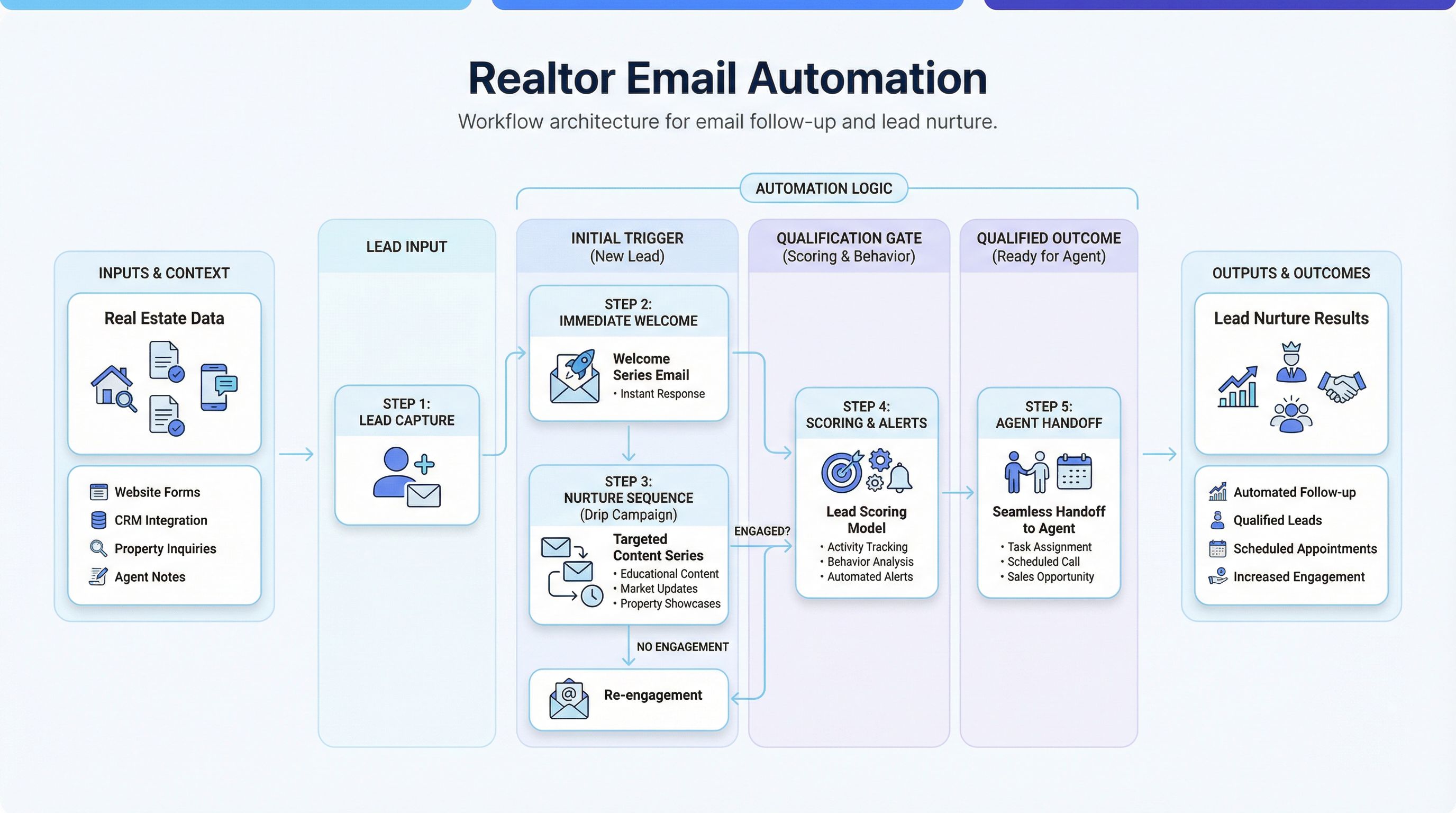
This article explains how to build a production-ready email automation workflow for real estate teams.
If your bigger goal is improving response timing and nurture across channels, start with the summary page on Real Estate Lead Follow-Up Automation and then use this article for the email layer.
What Realtor Email Automation Should Do
At a minimum, your email automation should:
- Respond quickly to new lead activity.
- Segment contacts by intent and readiness.
- Send stage-appropriate follow-ups.
- Trigger agent tasks at key decision points.
- Stop or branch when the lead engages.
If the workflow only sends scheduled emails but does not react to lead behavior, it will underperform.
Why This Workflow Matters
Automation is most valuable when lead volume is inconsistent and agent bandwidth is limited.
Benefits include:
- faster first response after inquiry
- fewer dropped leads between touches
- consistent messaging quality across the team
- clearer attribution by source and stage
- stronger nurture performance over longer cycles
Email should not replace calls and texts. It should support them with reliable timing and context.
The Core System Design
Build the workflow in layers.
1. Intake and Contact Hygiene
Every new contact needs required fields:
- first name
- source
- lead type (buyer/seller/investor)
- location preference
- timeline hint
Add validation rules to reduce bad data at entry. Clean inputs produce better personalization.
2. Segmentation Layer
Segment as early as possible using simple logic:
- new inquiry vs returning lead
- buyer vs seller intent
- hot/warm/long-term timeline
- engagement status (opened, clicked, replied)
Avoid over-segmentation early. Start with high-impact segments only.
3. Sequence Layer
Each segment should have its own email sequence:
- immediate acknowledgment
- value-based follow-up
- qualification checkpoint
- nurture cadence
Sequences should be short, purposeful, and behavior-aware.
4. Handoff Layer
Email workflow must create agent actions at the right time:
- replied email -> call task
- clicked high-intent link -> priority follow-up
- no response after threshold -> escalation task
Automation without handoff logic creates silent inbox activity, not conversion.
5. Reporting Layer
Track:
- time to first email
- open and reply rates by segment
- qualified lead rate by sequence
- appointment set rate
- conversion to active client
These metrics show workflow quality, not just email volume.
Recommended Workflow Blueprint
Step 1: Trigger on Lead Creation
When a lead enters CRM:
- assign source and segment tags
- enroll in correct primary sequence
- set owner and create first call task
Keep this trigger immediate and deterministic.
Step 2: Send Immediate Welcome Email
Send within 1-5 minutes.
Message should include:
- quick acknowledgment
- one useful next step
- one short qualifying question
Purpose is to start conversation, not deliver full education in one message.
Step 3: Send Value Email (Day 1 or Day 2)
If no response, send a useful follow-up:
- local market snapshot
- short buyer/seller roadmap
- next-step checklist
Value-first emails outperform generic “just checking in” templates.
Step 4: Qualification Email Checkpoint
Ask 2-3 key questions:
- timeline
- area priority
- financing readiness (for buyers)
If reply received, pause automation and move to live follow-up path.
Step 5: Branch by Engagement
Use behavior triggers:
- replied -> move to
Engagedstage + notify agent - multiple opens/clicks no reply -> send concise personal-style note
- no opens after several touches -> shift to long-term nurture
Step 6: Nurture Cadence
For long-cycle leads:
- 2-4 emails per month depending on segment
- blend educational and market-timing content
- periodic direct-response prompts
Goal is relevance and trust, not inbox saturation.
Step 7: Re-Engagement Loop
Every 60-90 days, run a reactivation email:
- acknowledge changing priorities
- offer updated strategy snapshot
- give one low-friction response option
This reclaims dormant leads without aggressive messaging.
Email Sequence Example (Starter)
Email 1: Immediate Acknowledgment
- confirm inquiry
- set expectation
- ask one short question
Email 2: Useful Resource
- send relevant local guidance
- show practical value
- invite reply with preference
Email 3: Qualification Touch
- clarify timeline and readiness
- offer short planning call
Email 4: Personal-Style Follow-Up
- concise text-like format
- one direct question
- low-pressure CTA
Email 5: Nurture Enrollment
- confirm future updates
- allow preference control
Keep each email focused on one objective.
Copy Framework for Better Response Rates
Use this structure in most follow-up emails:
- Context line (why this email now)
- Useful information (specific, short, relevant)
- Single question (easy to answer)
- Permission-based CTA
Example CTA styles:
- “Want me to send 3 options that match this?”
- “Would a 10-minute plan call be useful this week?”
- “If timing changed, I can adjust the search strategy.”
Avoid multi-question paragraphs. They reduce replies.
Personalization Without Complexity
You do not need advanced AI to personalize effectively.
Start with dynamic fields:
- first name
- preferred area
- lead source context
- stage-specific next step
Then add conditional snippets by segment:
- buyer financing track
- seller prep-for-listing track
- investor criteria track
Only add deeper AI-generated personalization after baseline sequence metrics are stable.
Automation Guardrails and Compliance
Protect deliverability and trust with rules.
Frequency and Timing Rules
- set max weekly sends per segment
- enforce send windows by local business hours
- suppress sends after manual outreach same day
Consent and Preference Management
- honor unsubscribe immediately
- track consent source where required
- provide easy preference updates
Content Quality Rules
- avoid spam-trigger wording
- keep brand voice consistent
- use fair housing-safe language
Workflow quality declines quickly when compliance is treated as an afterthought.
Common Mistakes (And Fixes)
Mistake 1: Long Generic Drip Sequence
Fix: shorten sequence and increase stage relevance.
Mistake 2: No Behavior Branching
Fix: trigger different paths based on opens, clicks, and replies.
Mistake 3: No Agent Handoff
Fix: add task triggers and SLA timers for human follow-up.
Mistake 4: Weak Subject Lines
Fix: use specific, contextual subjects tied to lead intent.
Mistake 5: No Regular Sequence Review
Fix: review performance monthly and revise underperforming touches.
30-Day Implementation Plan
Week 1: Audit and Strategy
- map current email touchpoints
- identify drop-off points
- define core segments and KPIs
Week 2: Build and Configure
- create sequence templates
- set workflow triggers and branches
- configure handoff tasks and alerts
Week 3: Test and Validate
- test all branches with sample leads
- verify suppression and opt-out behavior
- validate personalization fields
Week 4: Launch and Optimize
- launch with monitoring dashboard
- review reply quality and conversion indicators
- adjust copy and timing by segment
This phased rollout avoids workflow complexity too early.
KPIs to Track for Realtor Email Automation
- time to first email
- first reply rate
- qualified lead rate from email sequences
- appointment booked rate
- unsubscribe and spam complaint rate
- conversion to client by source
Do not optimize for opens alone. Replies and progression are stronger signals.
FAQ
How many automated follow-up emails should a realtor use?
A practical starting point is 4-6 emails in the initial sequence, then segment into nurture.
Should email automation run without calls or texts?
No. Best results come from multi-channel follow-up where email supports call and SMS touchpoints.
How often should we refresh automated email workflows?
Review metrics monthly, optimize quarterly, and perform full refresh at least every 12 months.
Is AI required for strong real estate email automation?
No. Strong segmentation and timing matter first. AI helps once your core workflow is stable.
Final Takeaway
Automate real estate follow up emails with a workflow that is fast, behavior-aware, and tightly linked to agent action.
If your team combines quick response, relevant sequencing, and clear handoffs, email automation becomes a predictable conversion channel instead of a passive drip campaign.
If you want help implementing this end-to-end inside your current CRM stack, book a consulting call and we can design the workflow around your lead sources and team capacity.